
Zeigarnik · macOS · Open source
See what you left unfinished.
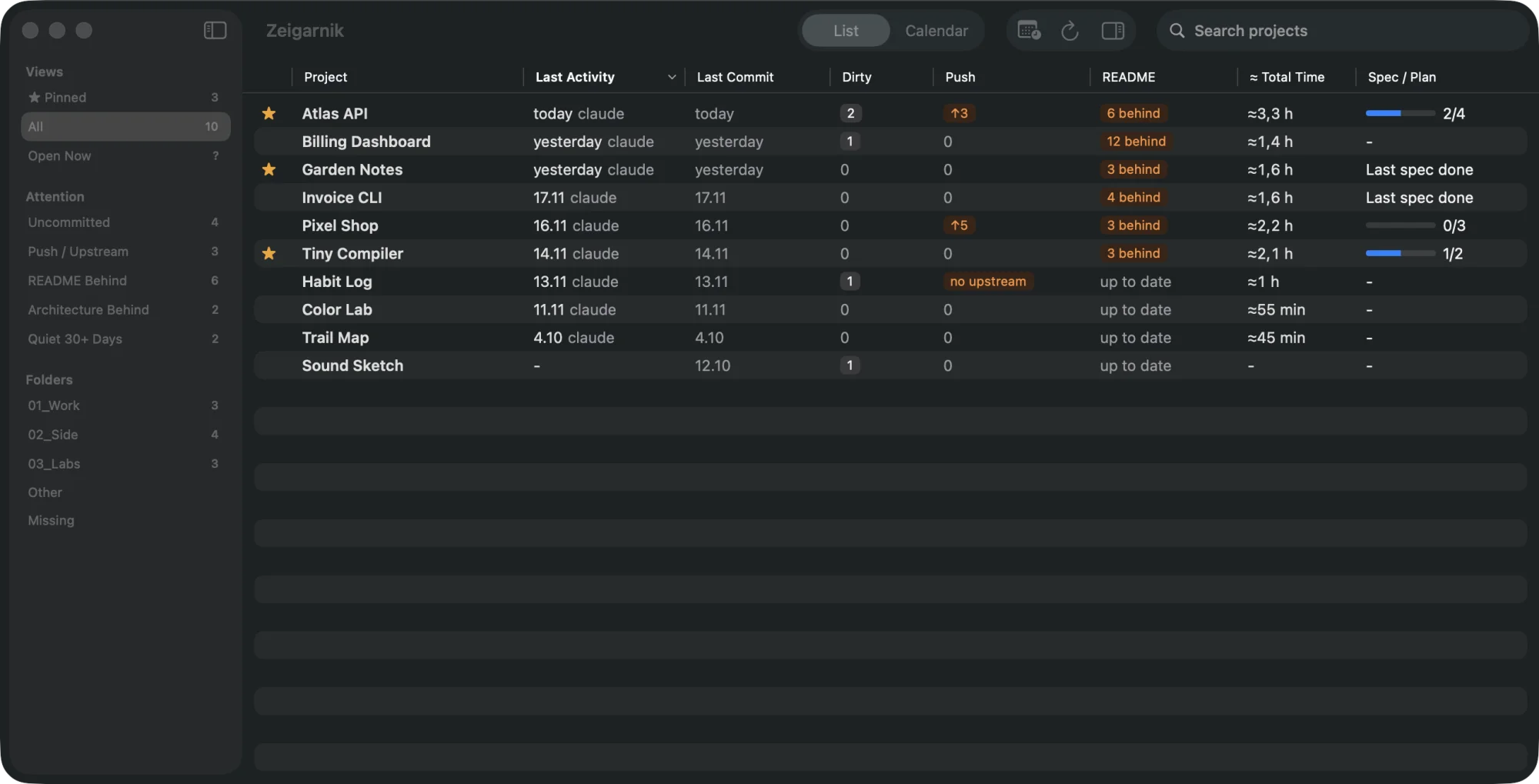
A macOS app that shows, day by day, what is going on across your git repositories: when you last worked on each one with Claude Code, Codex or a commit, what is uncommitted or unpushed, whether the README has fallen behind the code, and how far each spec or plan really got.
macOS 14+ · Apple Silicon and Intel · Signed, not notarized · Free, MIT licensed.
One list, every repository
Choose the folders that hold your repositories. Zeigarnik scans the git repositories inside them and keeps one row per project, with the facts you would otherwise collect by hand from git status, agent logs and your notes.
What it shows
-
Project list
Last activity by an agent or a commit, last commit, dirty files, push state, README drift, public or private, estimated total time and spec progress.
-
Sidebar filters
Pinned, open now, uncommitted, push or upstream problems, README or architecture behind, public, quiet for 30+ days, folders and missing.
-
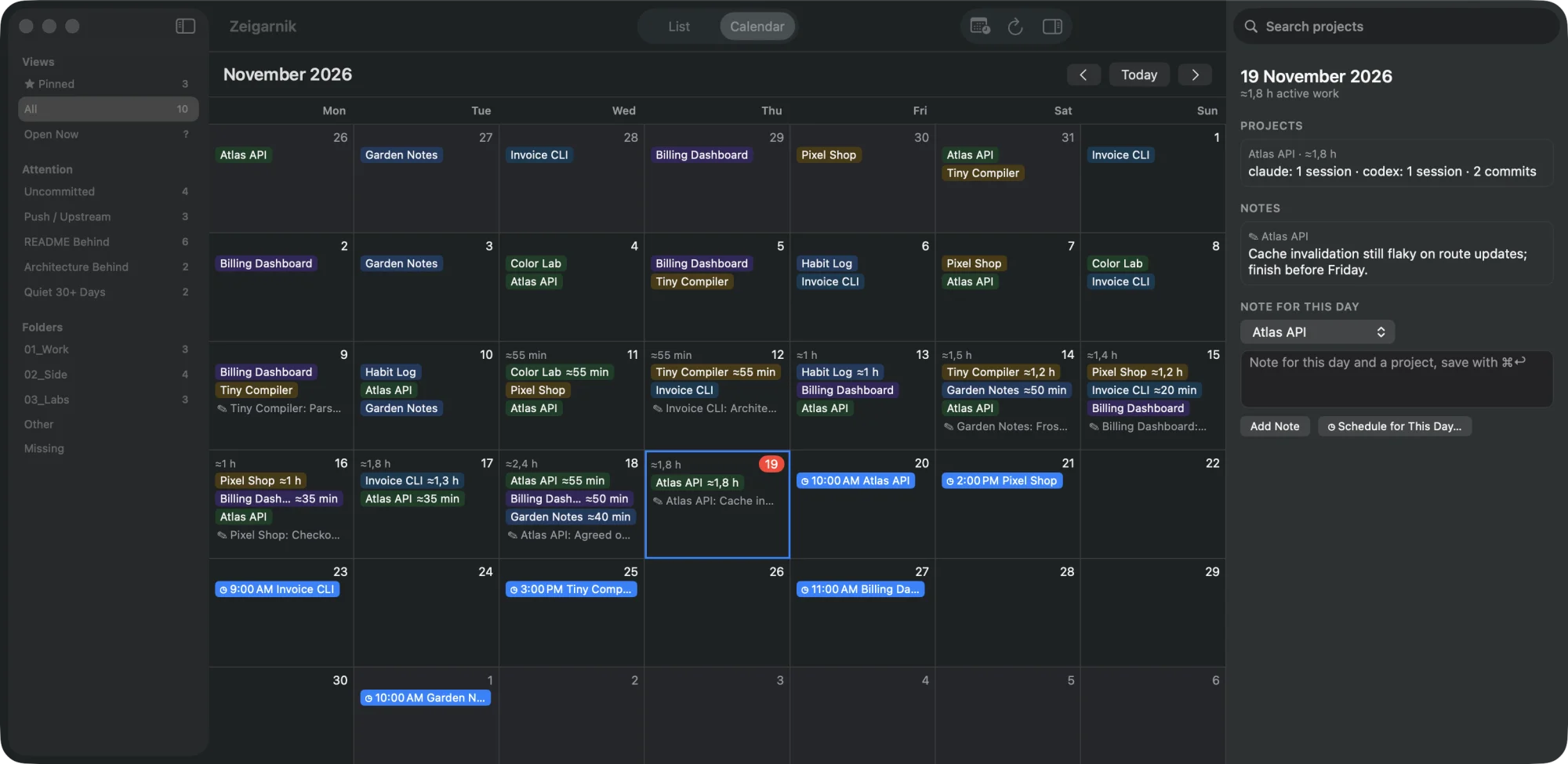
Calendar view
A month grid of activity, notes and scheduled items for each day.
-
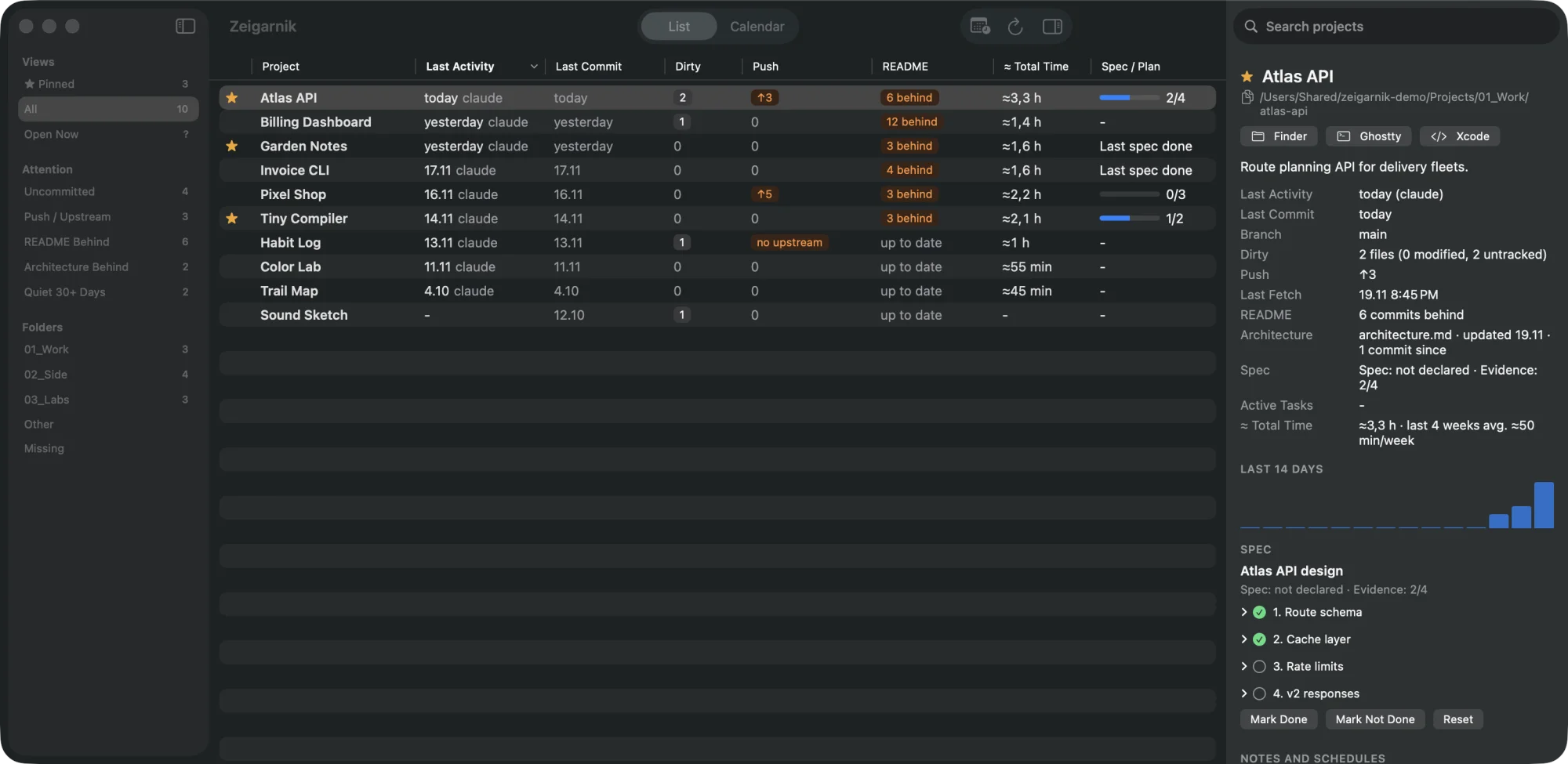
Project and day inspectors
Facts, 14 days of activity, spec tasks with the evidence behind them, notes and schedules.
-
Notes, pins and follow-ups
Pin projects, write notes against a project or a day, and schedule follow-ups that also land in macOS Calendar.
-
Note drafts
A README or architecture document behind, unpushed commits or uncommitted changes show up as a draft above the project's notes. Accept it as today's note, or dismiss that kind of draft until the state is resolved.
-
Notes for agents
The
zeigarnikcommand and its MCP server let Claude Code, Codex or another agent list, read, add and edit your notes. Agents cannot delete notes. -
Menubar and open in
A menubar extra with today's attention items and quick actions. Open a project in Finder, your terminal or editor, or herdr when it is installed.
A project, a day
Select a project to see its facts, 14 days of activity and spec tasks with evidence. Switch to the calendar to see which projects you touched each day, with notes and scheduled follow-ups.
Stays on your Mac
- Everything is stored on your Mac, in
~/Library/Application Support/Zeigarnik/. - From agent logs only the agent, session id, timestamp, working directory and source are stored, never prompt or message text.
- Credentials in remote URLs are stripped before anything is stored.
- Network access is
git fetchand, while the visibility check is on, one question per repository to GitHub or GitLab (throughghwhen installed). No telemetry. Turn the visibility check off in Settings > Checks.
Install
Requires macOS 14 or later. One download runs on Apple Silicon and Intel and carries the zeigarnik command-line tool inside.
- Download
Zeigarnik-<version>-macos.zipfrom the latest release. - Unzip it and move
Zeigarnik.appto/Applications. - The app is signed but not notarized, so macOS blocks the first launch. Open it once, then choose Open Anyway in System Settings > Privacy & Security, or clear the download flag with the command below.
- On first launch, a welcome window asks for the folders that hold your repositories. Zeigarnik reads only git repositories inside the folders you choose.
xattr -dr com.apple.quarantine /Applications/Zeigarnik.appmacOS asks for access to your Documents folder, to iCloud Drive if your folders or vault live there, and to Calendars when you turn on scheduling. Each feature degrades visibly when access is denied. Every release is signed with the same certificate, so macOS keeps these answers across updates.
Build from source
Requires macOS 14 or later, Xcode 16 or later (Swift 6), and xcodegen to regenerate the project after adding or removing files. Open the project, choose the Zeigarnik scheme, then Run, or build from the command line.
From Xcode
git clone https://github.com/ceaksan/zeigarnik.git
cd zeigarnik
open Zeigarnik.xcodeproj
From the command line
xcodebuild -project Zeigarnik.xcodeproj -scheme Zeigarnik -configuration Release -derivedDataPath build build
open build/Build/Products/Release/Zeigarnik.app
Sign the build with your own development certificate and macOS remembers its permission answers across rebuilds; an unsigned or ad-hoc signed build asks again after each rebuild.
Optional integrations
None of these are required; Zeigarnik uses what it finds.
| Integration | What it adds |
|---|---|
| Claude Code and Codex | Activity and time come from ~/.claude and ~/.codex. If you do not use one of them, nothing is shown for it. |
| Project table | A Markdown table in CLAUDE.md at the top of your first folder can name projects and point to directories outside your folders. |
| Numbered folders | Subfolders named like 01_Core or 02_Products become sidebar folder groups. |
| Specs and plans | Design specs and implementation plans, for example under docs/superpowers/ or OpenSpec, are read for task progress, with evidence from paths and commits. |
| Obsidian vault | Point Settings at a vault to show open Active Tasks counts per project. |
| herdr | With hc installed, projects open in a herdr pane are marked live and can be opened in herdr. |
| gh | With the GitHub CLI installed and signed in, the visibility check also works for your private repositories. |
Command line and MCP
The app ships the zeigarnik command, which reads and writes the app's notes in the same database. Put it on your PATH once:
ln -s /Applications/Zeigarnik.app/Contents/Helpers/zeigarnik ~/.local/bin/zeigarnikzeigarnik projects
zeigarnik status <project>
zeigarnik notes list --project <project>
zeigarnik notes add --project <project> "Release after the review"
zeigarnik draftsA project is named by its id, display name or path, and every read command takes --json. zeigarnik mcp runs an MCP server that lists projects, reads project status and lists, reads, adds and edits notes. There is no delete tool. To add it to Claude Code:
claude mcp add zeigarnik -- ~/.local/bin/zeigarnik mcpBuilt from source, the scanner also runs without the app and writes to the same database. --root is required and may be repeated; --db points at another database file.
swift run zeigarnik-scan --root ~/Projects --no-fetch
swift run zeigarnik-scan --root ~/Projects --vault ~/Vault --json
Why the name
Zeigarnik is named after the Zeigarnik effect: unfinished tasks are remembered better than finished ones. The app writes them down, so you do not have to keep them in your head.
Zeigarnik is free and open source under the MIT license. Read the source and README for the current behavior, tests and architecture.