
Porin · macOS · Beta
Hand over the export, not your customers.
You want an AI agent or an agency to analyse your store's orders, customers or campaign exports. Those files are full of names, phone numbers, emails, addresses, Turkish ID and tax numbers, IBANs and card numbers. Porin is a Mac app that finds that data on your own computer and masks it before the file goes anywhere, and keeps the products, amounts, dates, campaigns and provinces the analysis needs.
See where the personal data is
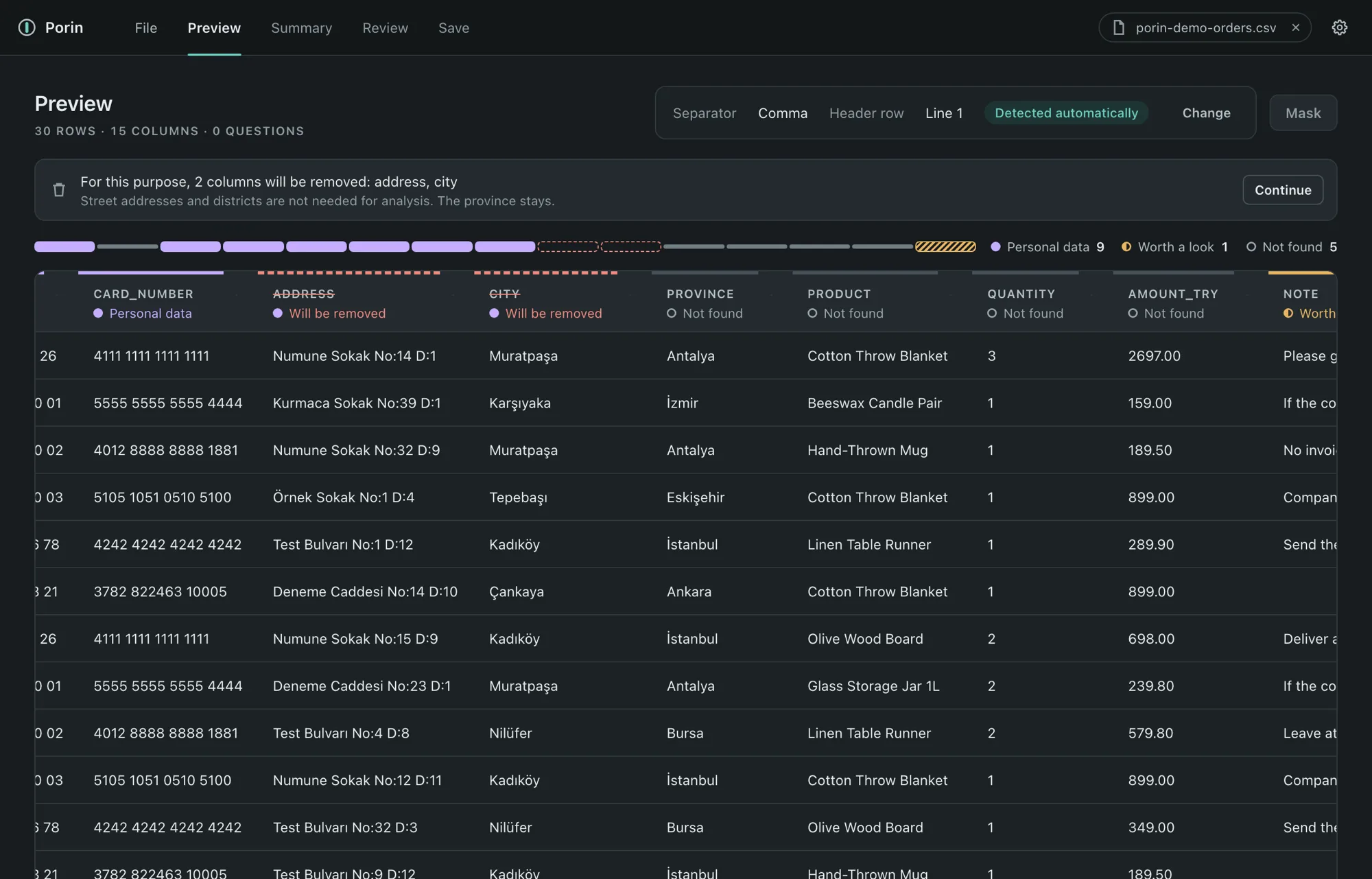
Open an export and Porin reads it as a table. Every column header says what Porin found: personal data, worth a look, or nothing found. Before anything is masked, you see which columns will be removed and why.
How it works
Every step has a safe default. You can get a protected file by pressing forward, and look closer only where you want to.
- Export. Download the export from your store panel as you normally do. The agent prompt below lets your own AI assistant tell you where to find it, without ever seeing the file.
- Open it in Porin. The file is read on your computer. Porin detects the separator and the header row, and you can change both.
- Mask. Personal data is replaced with tokens, columns the analysis does not need are removed, and notes are scanned. The summary shows what was masked and how sure Porin was.
- Review, if you like. Search the masked table, mask a value, lift a mask with a warning, remove a column or undo any change.
- Save and hand over. Porin saves a masked CSV, a report and a decisions file. Give those to your agent or agency. Porin never talks to the agent.
What it masks, what it keeps
-
Always masked
Email, Turkish phone numbers, TC kimlik and tax numbers, IBANs, card numbers and secret values in URL parameters. These masks are locked and cannot be lifted; you can still remove the whole column.
-
One token per customer
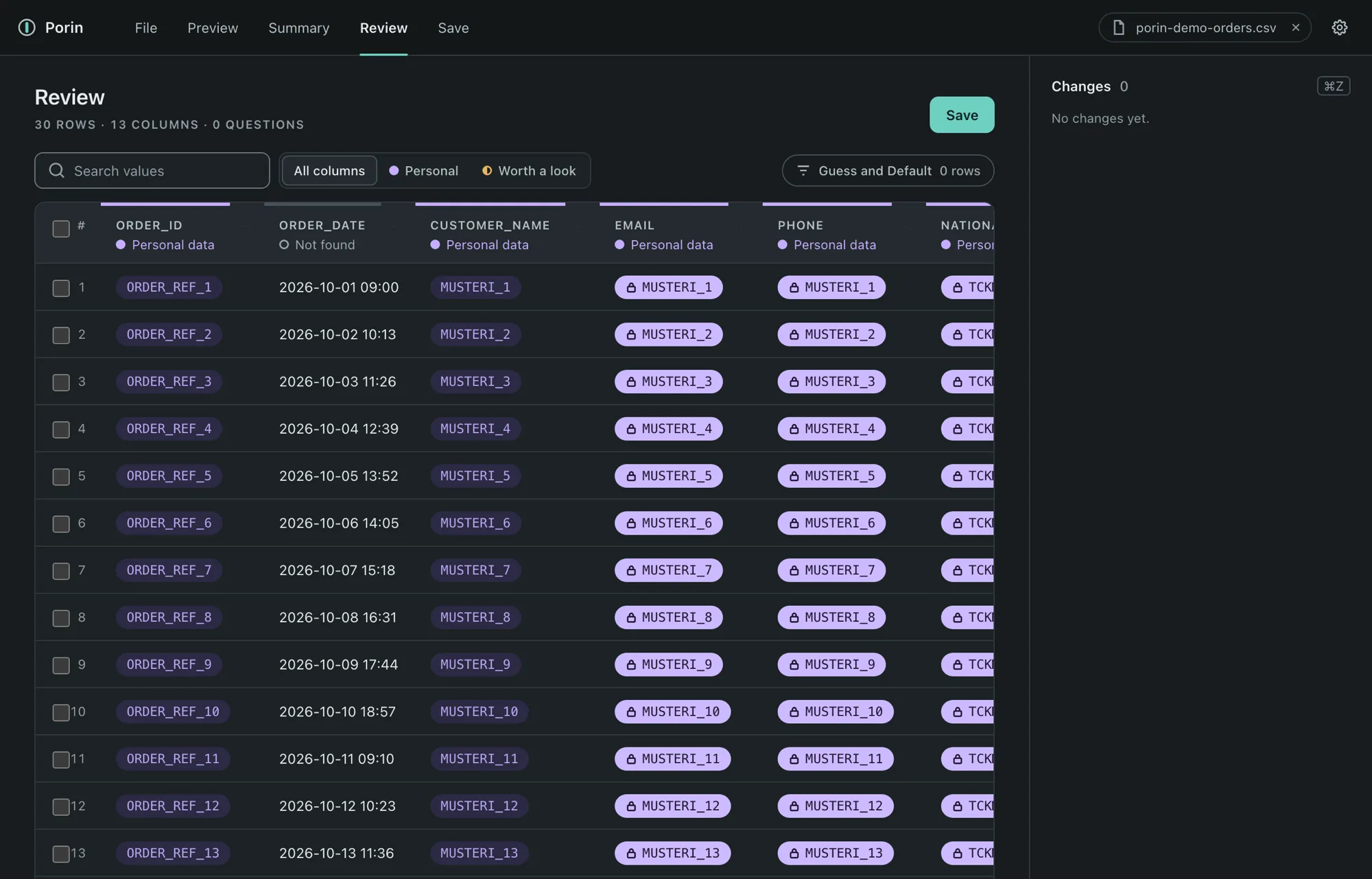
A customer's name, email and phone all become the same token, such as
MUSTERI_12(Turkish for customer 12). An agency can count repeat buyers without seeing who they are. -
Notes are scanned
Phone numbers and other strong patterns inside free text are masked, and names are found where Porin can. Special-category terms under KVKK article 6, such as health or religion, are masked by default.
-
Addresses come out
Street address and district are removed. The province column stays, so regional questions still work.
-
Analysis columns stay
Products, quantities, amounts, dates and campaign fields are kept as they are.
-
You stay in control
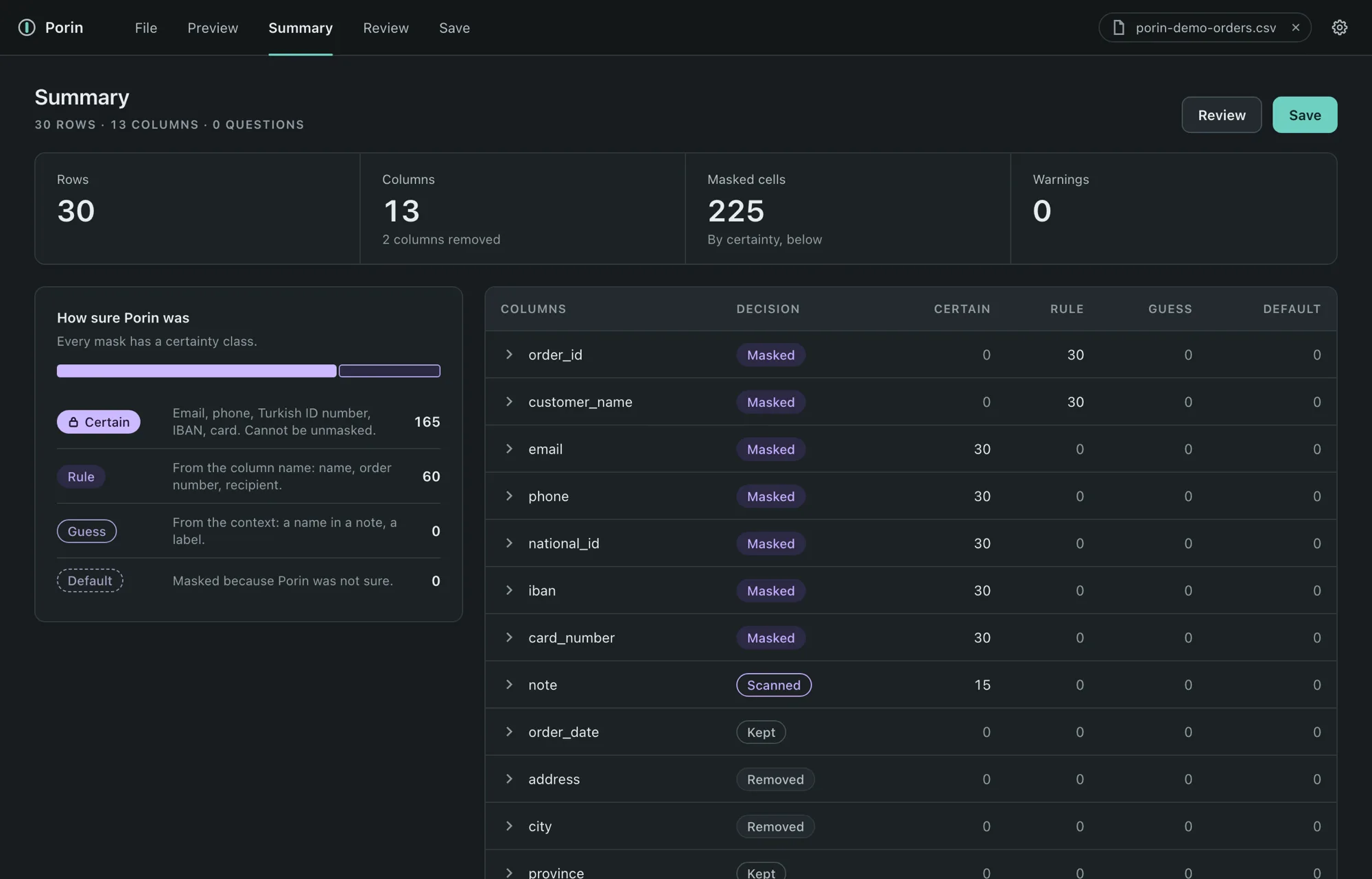
Mark a column as personal or not personal, remove columns, lift some masks after a warning, and undo any change. Every mask carries a certainty class: Certain, Rule, Guess or Default.
After masking
The summary counts what happened to each column. The review table shows the masked file itself, with filters for the masks Porin was least sure about.
Your file stays on your computer
- Processing is local. The file does not leave your computer.
- The app makes no network request. Its tests run the app in a sandbox that fails on any outbound connection, and deliberate test requests from the interface and from the core were caught.
- The only ways out are buttons you click that open the contact page in your browser.
What it does not promise
- Masked is not the same as unidentifiable. Tokens and the columns that stay can still point to a person when combined, so share the masked file only with those who need it.
- Porin reduces the risk of handing over personal data. It does not certify compliance with KVKK or any other law.
- Name detection in free text is best effort. Check the notes column in Review before you save.
- Porin reads CSV and TSV files today. XLSX comes later.
A prompt for your own agent
Paste this into your AI assistant before you start. It asks the agent for directions only, never for your panel or your raw file, and makes it refuse a file that has not been through Porin.
I want to analyse an export from my online store with your help. Follow these rules for the whole conversation.

1. Directions only. Tell me step by step where to find the export in my store panel, for example "Orders > Export". Do not open, browse or log in to my panel, and never ask for my password.
2. No raw files. A raw export holds customer names, phone numbers, emails, addresses, Turkish ID and tax numbers, IBANs and card numbers. Do not read or analyse one.
3. Porin first. Once I have the export, I open it in Porin on my computer, mask it and save the result. You analyse only what Porin saves: porin-maskeli.csv, with porin-rapor.md and porin-kararlar.json.
4. If I upload or paste a file that has not been through Porin, stop. Do not analyse it. Tell me to remove it from this conversation, mask it in Porin and come back with the masked file. A masked file has tokens such as MUSTERI_1 where names, emails and phone numbers were.
5. A token such as MUSTERI_12 stands for one customer. Answer in tokens and do not try to find out who they are.

Answer in the language I write in.
My store platform: <name it>
What I want to learn: <your question>
Early access
Porin is a Mac app in beta and there is no public download yet. If you hand exports to an agent or an agency and want to try it, get in touch and I will reach out when it is ready.
The interface is in English, and in Turkish when macOS is set to Turkish.